> ## Documentation Index
> Fetch the complete documentation index at: https://docs.sendify.dingstore.cn/llms.txt
> Use this file to discover all available pages before exploring further.

# 维护联系人信息

> 批量或单独添加、编辑和删除联系人

## 批量添加联系人

<Icon icon="arrow-right-to-bracket" iconType="solid" /> `联系人` → `全部联系人`，或 `发信任务` → `添加联系人`

您可以通过上传表格文件批量添加联系人。导入流程为：选择文件 → 匹配字段 → 添加标签 → 完成导入。

<Steps>
  <Step title="选择文件">
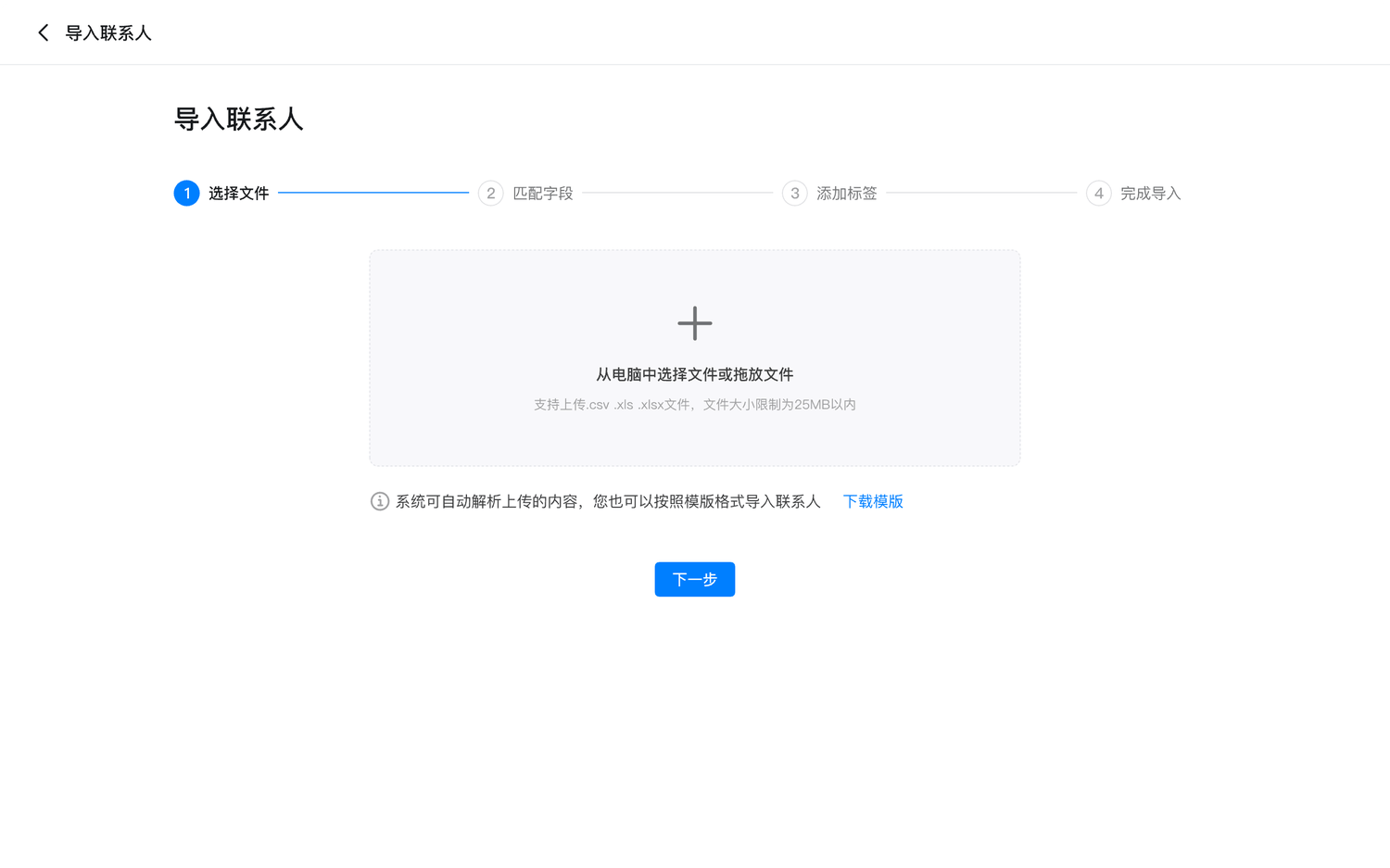
    上传包含邮箱地址的联系人列表，系统会自动解析内容。目前支持的字段包括：邮件地址、姓（Last Name）、名（First Name）、公司和职位。

    您也可以下载联系人导入模板，按模板格式整理数据。支持 `.csv`、`.xls` 和 `.xlsx` 文件。
    <Frame>
      <img src="https://mintcdn.com/sendify-3a1f7fa4/IaJHUY9fCSXuo_lG/contacts-import-file.png?fit=max&auto=format&n=IaJHUY9fCSXuo_lG&q=85&s=047cfbd70473156c87938f471a834f4b" alt="选择联系人导入文件" width="1500" height="937" data-path="contacts-import-file.png" />
    </Frame>
  </Step>

  <Step title="匹配字段">
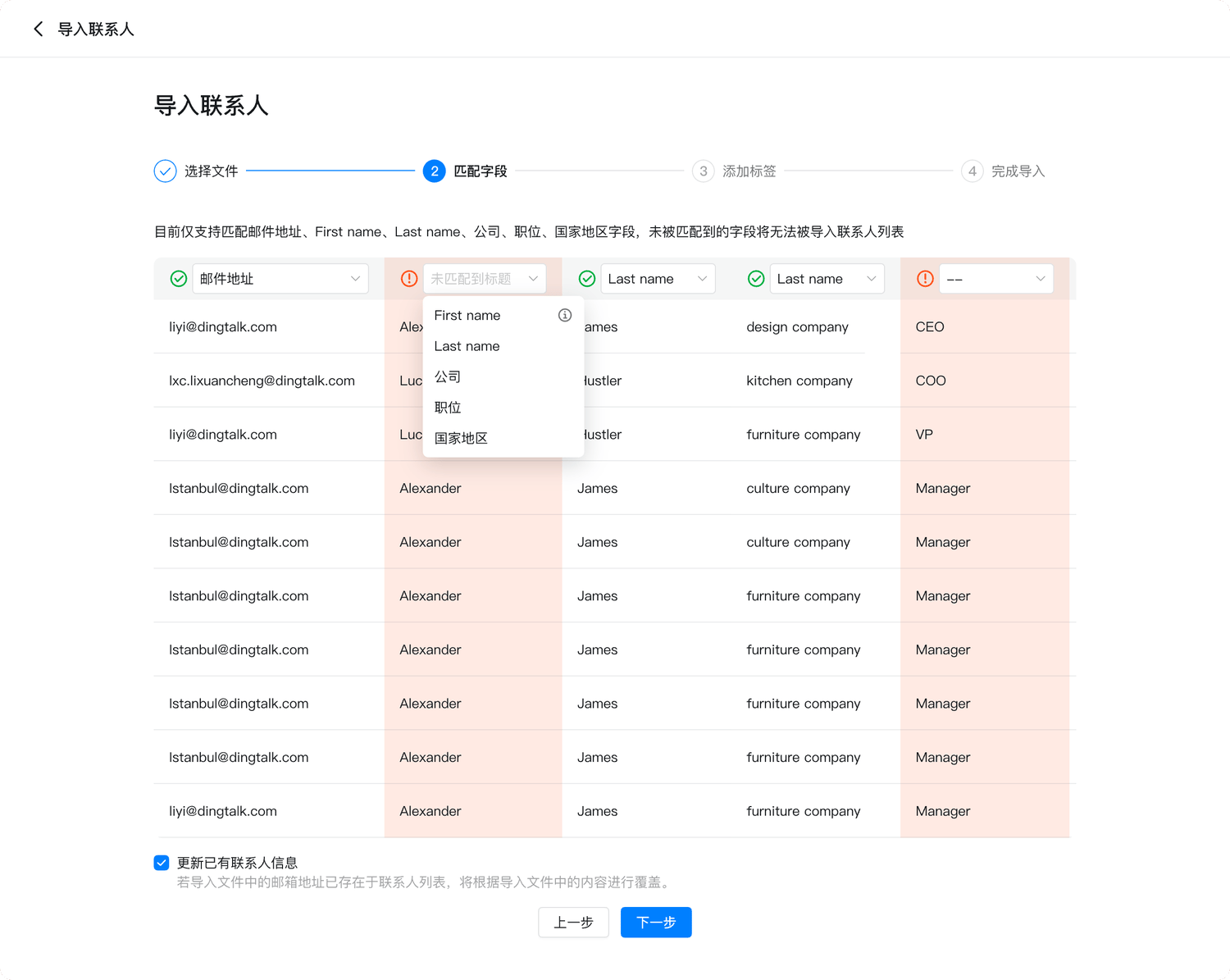
    * 系统会自动识别上传文件的表头并匹配现有字段；未自动匹配的字段需要手动关联，未匹配的数据列不会被导入。
    * 如果导入文件中的邮箱地址已存在，系统会使用文件中的内容覆盖已有联系人信息。
    * 请在匹配表头时检查邮箱格式是否正确。
    <Frame>
      <img src="https://mintcdn.com/sendify-3a1f7fa4/IaJHUY9fCSXuo_lG/contacts-match-fields.png?fit=max&auto=format&n=IaJHUY9fCSXuo_lG&q=85&s=fb0246234e600289f7790776e2e680f8" alt="匹配联系人字段" width="1500" height="1195" data-path="contacts-match-fields.png" />
    </Frame>
  </Step>

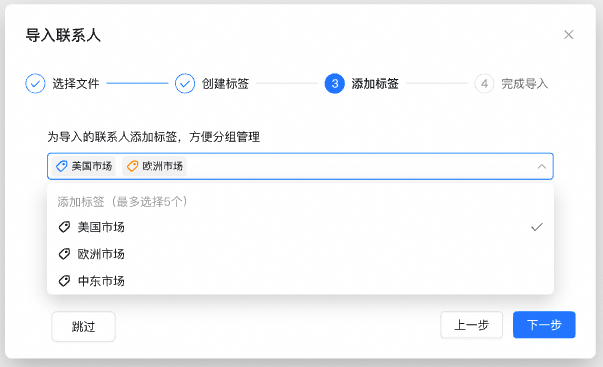
  <Step title="添加标签">
    为导入的联系人添加标签，方便后续分组管理。此步骤可以跳过。

    <Frame>
      <img src="https://mintcdn.com/sendify-3a1f7fa4/IaJHUY9fCSXuo_lG/contacts-import-tags.png?fit=max&auto=format&n=IaJHUY9fCSXuo_lG&q=85&s=fdbb77ea87ad4925e884bd26c2d5e835" alt="为导入联系人添加标签" width="603" height="367" data-path="contacts-import-tags.png" />
    </Frame>
  </Step>

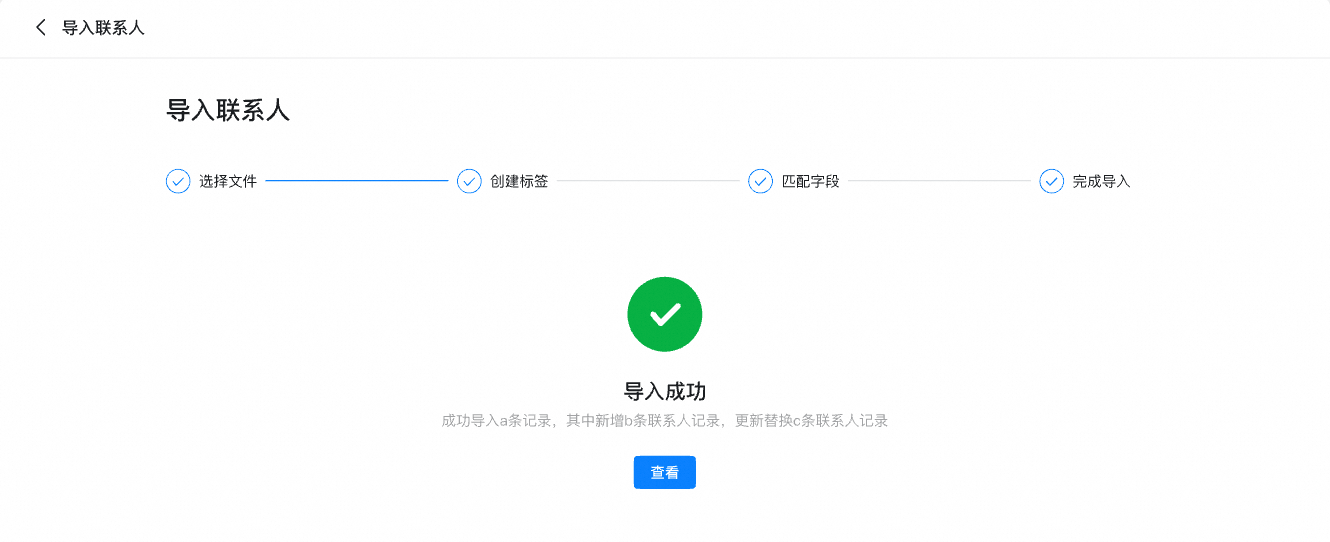
  <Step title="完成导入">
    导入完成后，系统会显示本次导入的状态。

    <Frame>
      <img src="https://mintcdn.com/sendify-3a1f7fa4/IaJHUY9fCSXuo_lG/contacts-import-complete.png?fit=max&auto=format&n=IaJHUY9fCSXuo_lG&q=85&s=47835dbbe87ac336fe4dbf3d7b88d880" alt="联系人导入完成" width="1330" height="542" data-path="contacts-import-complete.png" />
    </Frame>
  </Step>
</Steps>

## 单独添加联系人

<Icon icon="arrow-right-to-bracket" iconType="solid" /> `联系人` → `全部联系人`

<Steps>
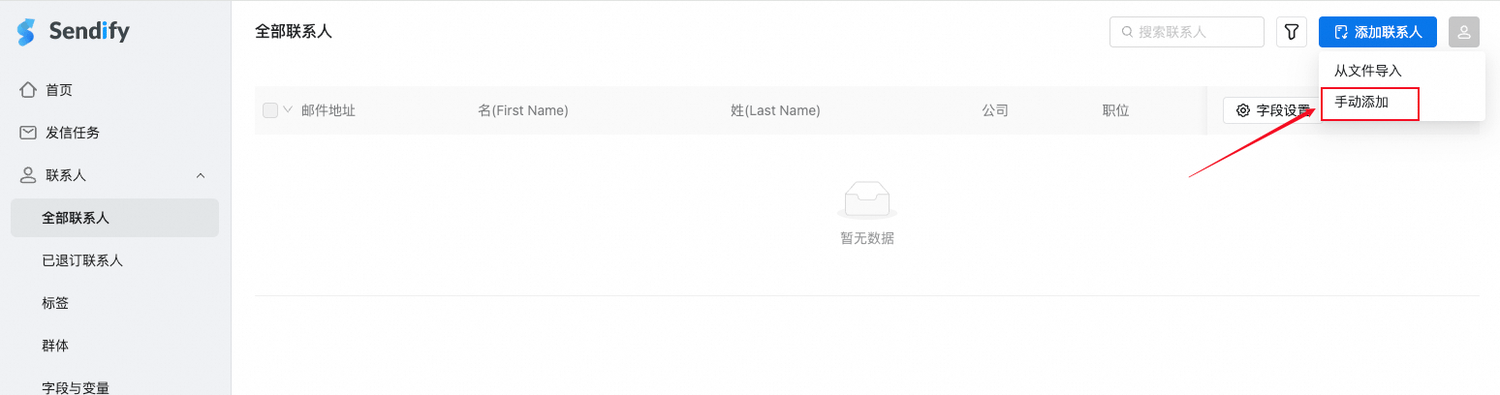
  <Step title="进入手动添加">
    点击「添加联系人 → 手动添加」。

    <Frame>
      <img src="https://mintcdn.com/sendify-3a1f7fa4/IaJHUY9fCSXuo_lG/contacts-manual-entry.png?fit=max&auto=format&n=IaJHUY9fCSXuo_lG&q=85&s=a2f7947cc1d038105d760ac3d0fd7fc1" alt="选择手动添加联系人" width="1500" height="395" data-path="contacts-manual-entry.png" />
    </Frame>
  </Step>

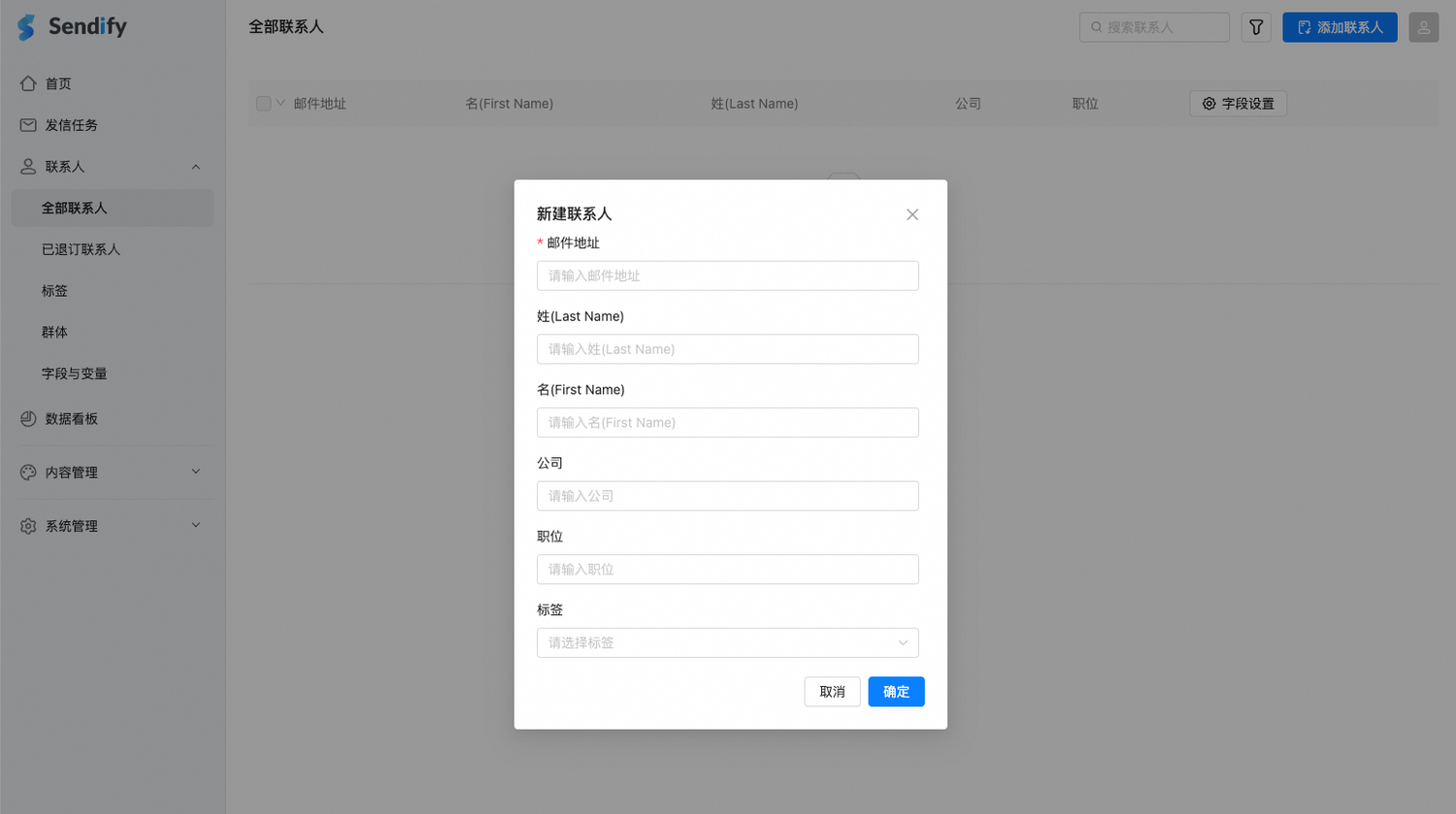
  <Step title="填写联系人信息">
    填写联系人信息并点击「确定」。

    <Frame>
      <img src="https://mintcdn.com/sendify-3a1f7fa4/IaJHUY9fCSXuo_lG/contacts-manual-form.png?fit=max&auto=format&n=IaJHUY9fCSXuo_lG&q=85&s=28f7585310f81818fada022024fb579d" alt="填写新联系人信息" width="1500" height="839" data-path="contacts-manual-form.png" />
    </Frame>
  </Step>

  <Step title="查看新联系人">
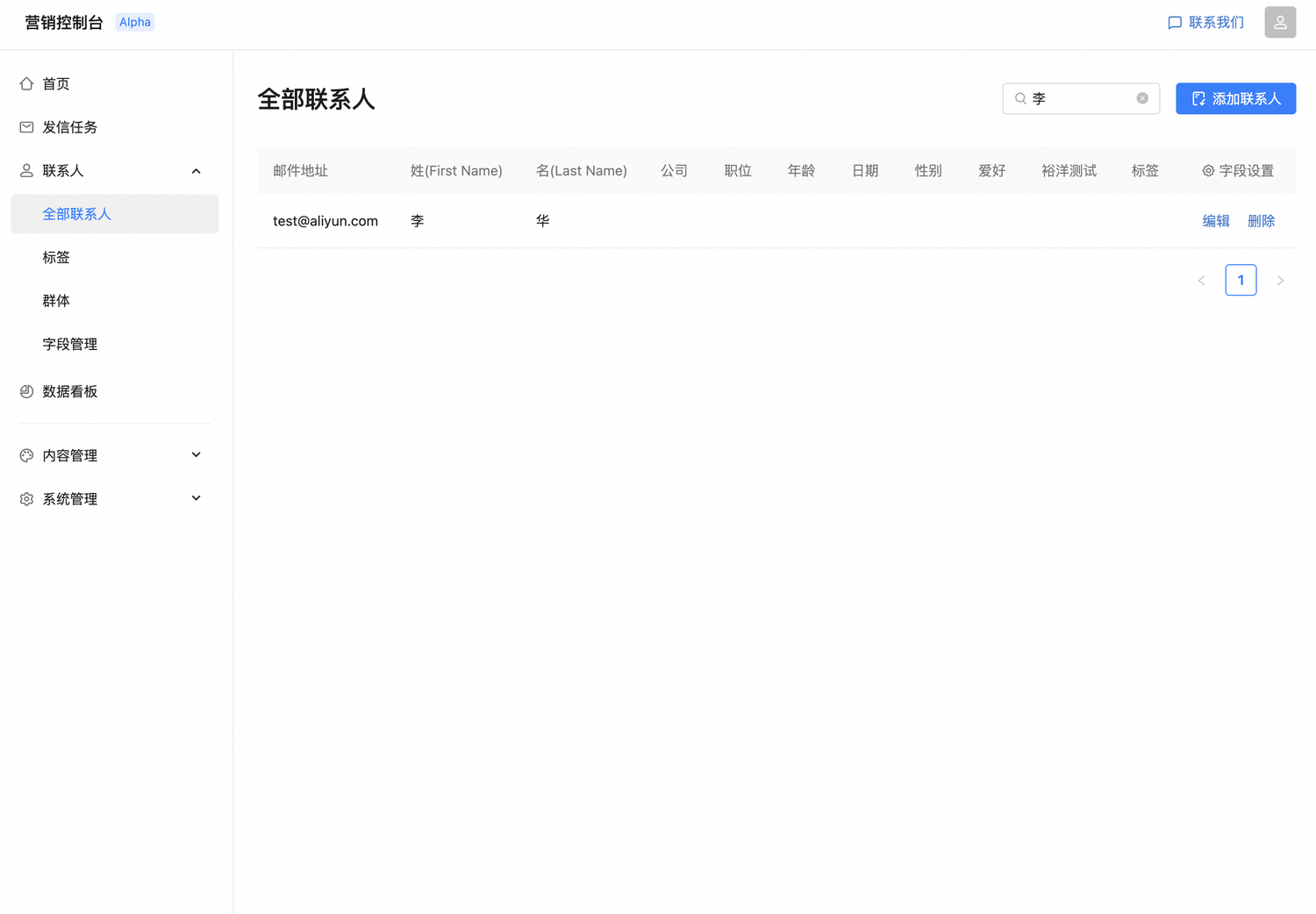
    创建成功后，可在「全部联系人」中查看新联系人。

    <Frame>
      <img src="https://mintcdn.com/sendify-3a1f7fa4/IaJHUY9fCSXuo_lG/contacts-list.png?fit=max&auto=format&n=IaJHUY9fCSXuo_lG&q=85&s=f4615345f44a0cd27a3559720e895cc9" alt="查看联系人列表" width="1500" height="1042" data-path="contacts-list.png" />
    </Frame>
  </Step>
</Steps>

## 编辑和删除联系人

您可以在联系人列表中修改或删除已添加的联系人信息。

<Frame>
  <img src="https://mintcdn.com/sendify-3a1f7fa4/IaJHUY9fCSXuo_lG/contacts-edit-delete.png?fit=max&auto=format&n=IaJHUY9fCSXuo_lG&q=85&s=9ae9f4cad3eb92ac6c0df1409790c1db" alt="编辑或删除联系人" width="1282" height="165" data-path="contacts-edit-delete.png" />
</Frame>


This documentation is built and hosted on [Mintlify](https://mintlify.com), a developer documentation platform.